News & Feature Release Updates
Coming Soon: Goodbye Passwords, Hello Passkeys!

Our New Passkeys Feature Will Simplify And Secure App Logins Using FaceID and Fingerprint Biometrics.
Coming Soon To Your Thrive App!
We're excited to announce the upcoming launch of Passkeys: our new, more secure standard for two-factor authentication (2FA) on the Thrive platform. Passkeys replace traditional Passwords with a faster and simpler method of logging in to your Thrive app.
From the beginning of February we'll begin updating our customer apps to add this new functionality. When your app is updated, your employees will be asked to create a Passkey using biometrics like FaceID or Touch ID (fingerprint) as shown below.
Creating a Passkey means that if an employee gets logged out of your app, they no longer have to remember their Password to get back in. They simply use FaceID or Touch ID to get back into your app instantly - no more Password reset requests!
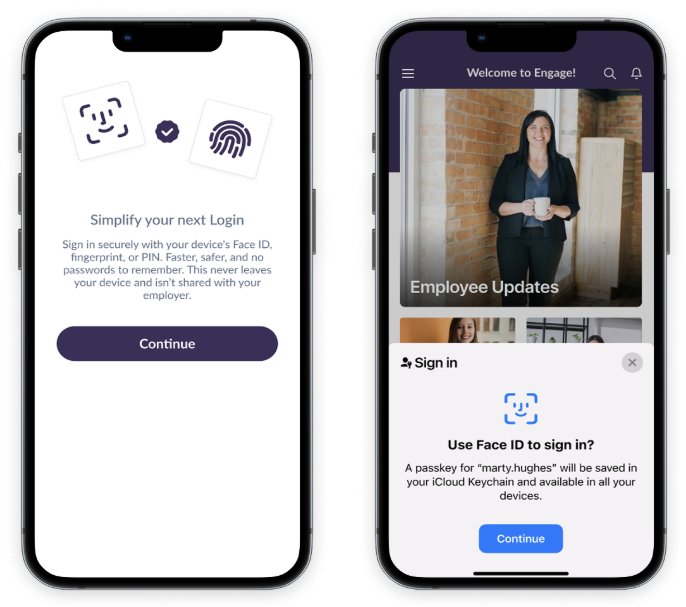
This update therefore not only makes it easier for your employees to stay logged in your Thrive Employee App, it also means that you as an App Admin will have a much-reduced workload in terms of dealing with Password resets and employees not knowing their login details!
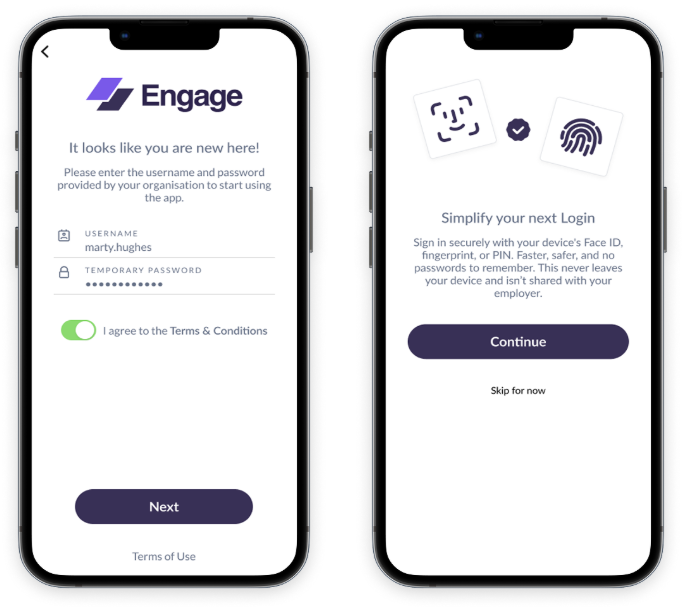
While your employees will still create their own Password when registering in your app for the first time, they will also be asked to 'Simplify Your Next Login' by creating a Passkey during the new user registration process.
Passkeys Can Be Optional Or Mandatory
As an App Admin, you'll get to decide whether the creation of a Passkey is Optional or Mandatory for your employees. If you choose to make them Optional, your employees can add a Passkey when prompted, but they'll also see a 'Skip For Now' option which allows them to continue using Password logins.
If you set Passkey creation as Mandatory, there will be no option to skip and Passkeys will completely replace Passwords for a simpler and more secure login experience to your app.
The choice is yours, but our recommendation is to make Passkey creation Mandatory so that you have one single, simple, consistent and secure way of logging into your employee app. To help put your employee's mind at ease: the Passkey creation screen (as shown above) makes it clear that your employee's Biometric Passkey data does not leave their device and is not accessible by their employer.
We'll Be Back In Touch Before We Update Your App
As usual, we'll need to release an update for your app through the Appstore and Google Play, to add the new Passkeys feature. Before we do that, we'll reach out to let you know that its coming. We're hoping to begin that process around the start of February.
Let Your Employees Know That Passkeys Are Coming
In the meantime, you may wish to make a post in your app to let your employees know that they'll be asked to create a Passkey in the next few weeks. To help, we have created the following template for you to copy, paste and edit as appropriate, as a news story for your app:
Template News Story: Goodbye Passwords, Hello Passkeys!
You can use this template to inform your employees about the upcoming update and to make it clear that Passkeys will not only make your app more secure, but makes your employee's lives easier by providing a much simpler way to log into your app!
Note: If your app uses Active Directory Login, the new Passkeys feature will not apply to your app and your employees will continue to log in using their company SSO Email Address and Password.
Questions?
If you have any questions about the upcoming Passkeys rollout, or about anything else you need help with; don't hesitate to reach out to us at support@thrive.app and we'll be happy to schedule a call if you'd like to chat through the Passkeys implementation in more detail!
In the coming weeks we'll also be adding further details to the Thrive Help Centre website, including information about how a user's mobile app Passkey will also allow them to sign into your webapp.